Premium Windows 10/11 & Server

Prapl SQL Backup

Your database is one failed disk, one bad migration, one wrong DELETE away from being gone. SQL Backup quietly takes encrypted, verified backups of MySQL, PostgreSQL, MongoDB and MariaDB — daily, weekly, monthly, whatever you choose — so that day never becomes a disaster.

$5/ month · billed annually$29/mo
No card for trial 14-day money-back guarantee Never auto-renews
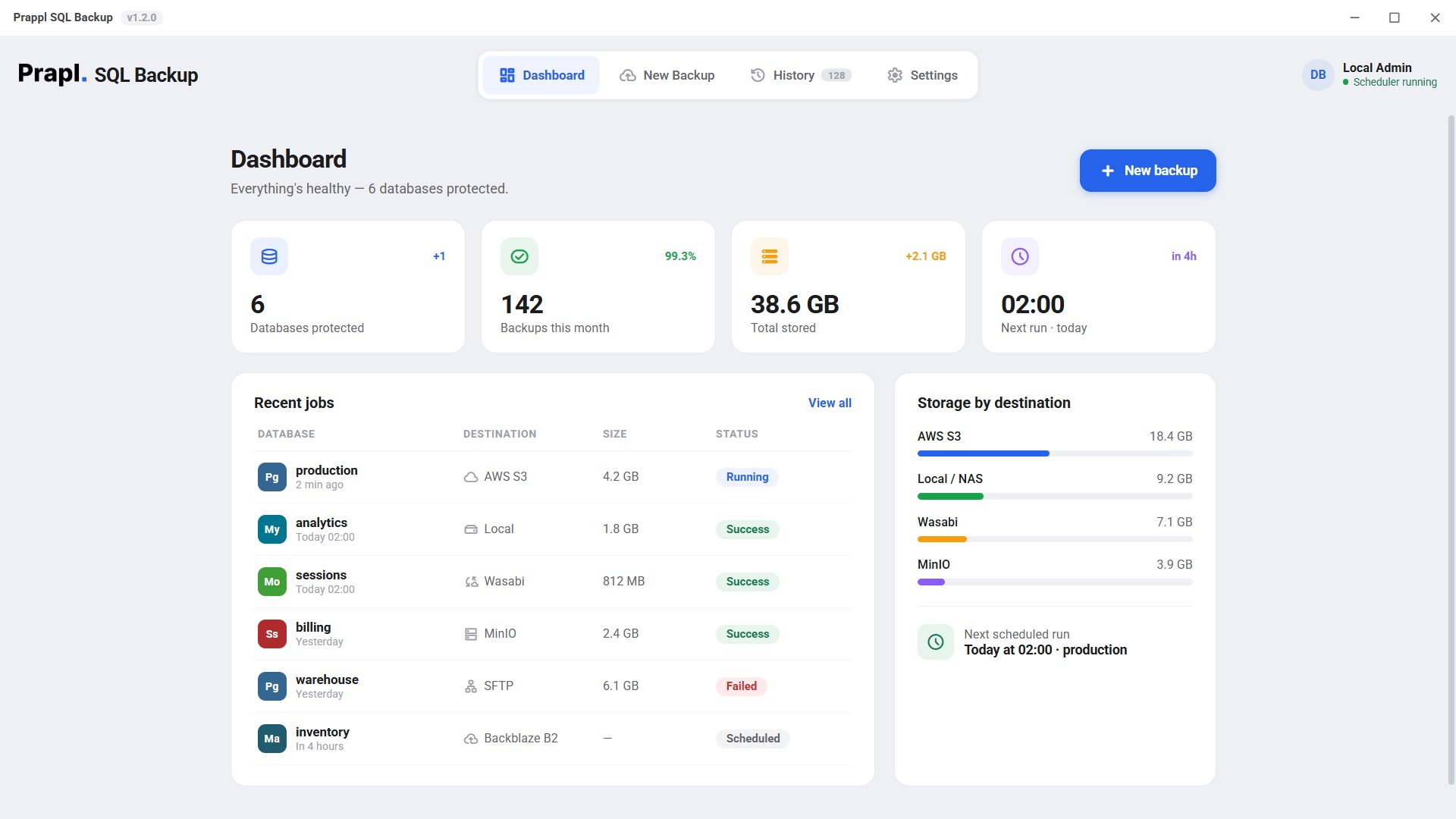
Prapl SQL Backup dashboard showing six protected databases, 142 backups this month and storage split across AWS S3, local NAS, Wasabi and MinIO
Built for the databases you already run
MySQL PostgreSQL MongoDB MariaDB Local · NAS · S3 · SFTP
Why backups matter

Every database has a disaster story.

It never happens during business hours. A disk quietly fills up and corrupts the tables. A migration script that worked in staging takes production down. Ransomware finds the one server everyone forgot. Or someone — maybe you — runs DELETE without the WHERE.

At that moment, only one question matters: when was the last good backup? For teams who answer "last quarter, I think, on someone's laptop" — that's not an outage, that's the end of the data. 93% of companies that suffer major data loss without recovery never fully reopen their doors.

SQL Backup exists so your answer is different: "last night, right on schedule — encrypted, checksum-verified, in two locations." That answer turns a catastrophe into a ten-minute restore.

Minute 0 — primary disk fails

prod-db-01 stops responding mid-write

Minute 11 — the scramble

"Where's the latest dump? Does it even restore?"

Minute 12 — with SQL Backup

Last verified backup: 2 hours ago · AWS S3

Minute 27 — restored

Database back online. Crisis cancelled.
Without a backup plan

The night a disk dies or a query goes wrong:

  • Hours of downtime while you hunt for an old dump — if one exists
  • Every order, user and record since the last manual export is gone for good
  • An unencrypted .sql file on a laptop is your "disaster recovery"
  • Nobody ever tested a restore — you find out it's corrupt at the worst moment
  • Explaining to customers why their data no longer exists
With SQL Backup

The same night, protected:

  • A fresh backup from earlier tonight is sitting in your S3 bucket and on your NAS
  • It was checksum-verified the moment it was written — you know it restores
  • AES-256 encrypted, so a stolen drive or bucket leak exposes nothing
  • If a job had failed, you'd have received an email — before you needed it
  • Restore, verify, back to bed — the incident becomes an anecdote
Why SQL Backup

A safety net you'll never think about

Set it once. It runs, verifies, prunes and alerts — until the day you need it, and then it just works.

Your schedule, not ours

Hourly, daily, weekly, monthly or on-demand — at any time you pick. Two in the morning or two in the afternoon, SQL Backup never misses it.

AES-256 encrypted

Backups are encrypted before they're written. A leaked bucket or stolen disk exposes noise, not your customers' data.

Checksum-verified

A backup you can't restore isn't a backup. Every archive is verified after writing, so "it looked fine" never bites you.

Compressed with gzip

Archives typically shrink 60–75%, so a deep history of backups costs megabytes, not your whole disk.

Retention you control

You decide how many copies to keep and for how long — 7 backups or 300, a week or a year. Older archives prune automatically; no babysitting disk usage.

Email on failure

If a job fails or can't reach its destination, you know within minutes — not months later when you need the file.

Product tour

See exactly what you're getting

Real screenshots from SQL Backup v1.2 — click any view to zoom in.

Prapl SQL Backup dashboard showing six protected databases, 142 backups this month and storage split across AWS S3, local NAS, Wasabi and MinIO

Dashboard. Six databases protected, every job's status at a glance, storage by destination.

How it works

Protected in four answers

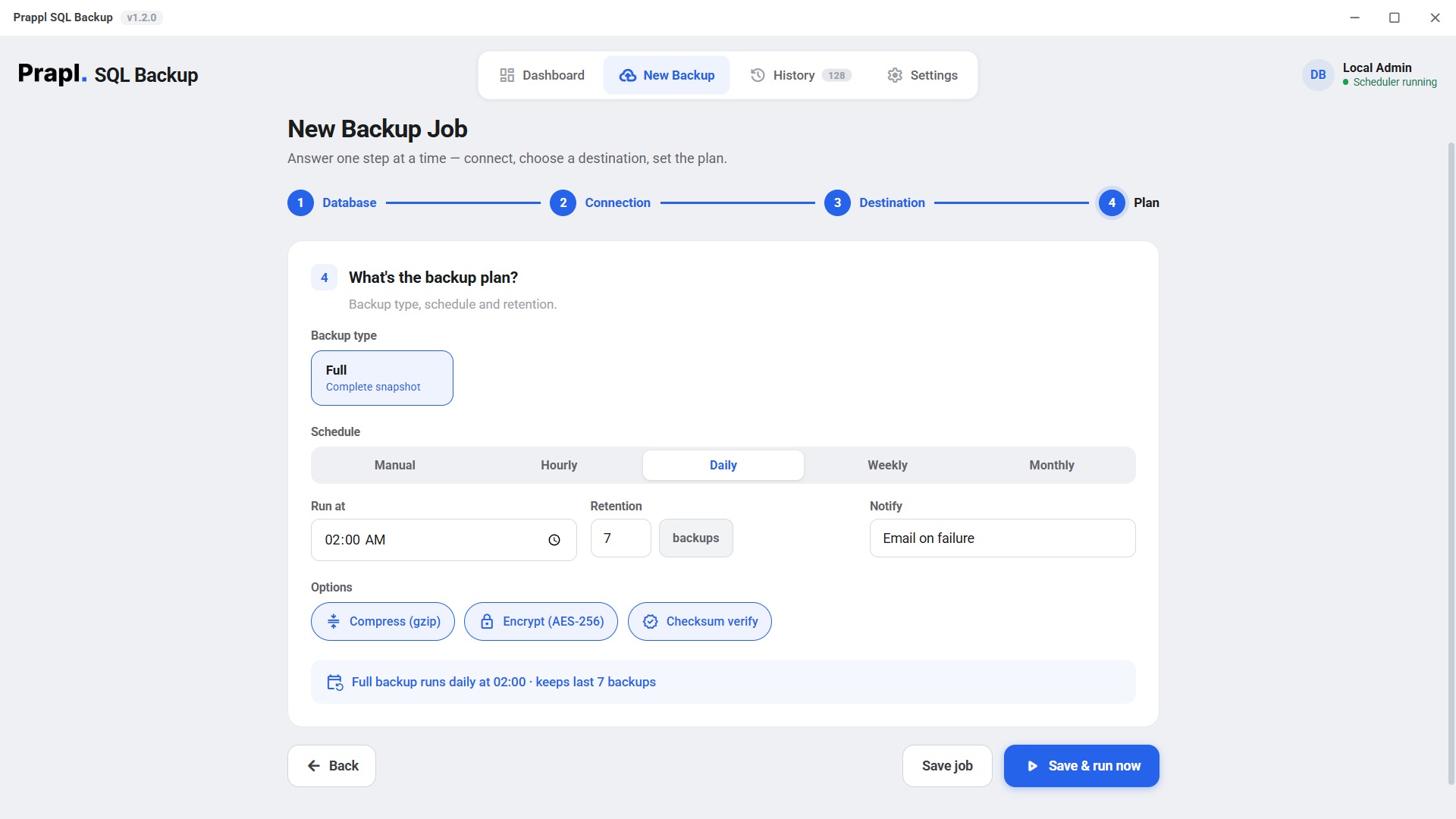
The setup wizard asks one question at a time. From install to your first verified backup in under five minutes.

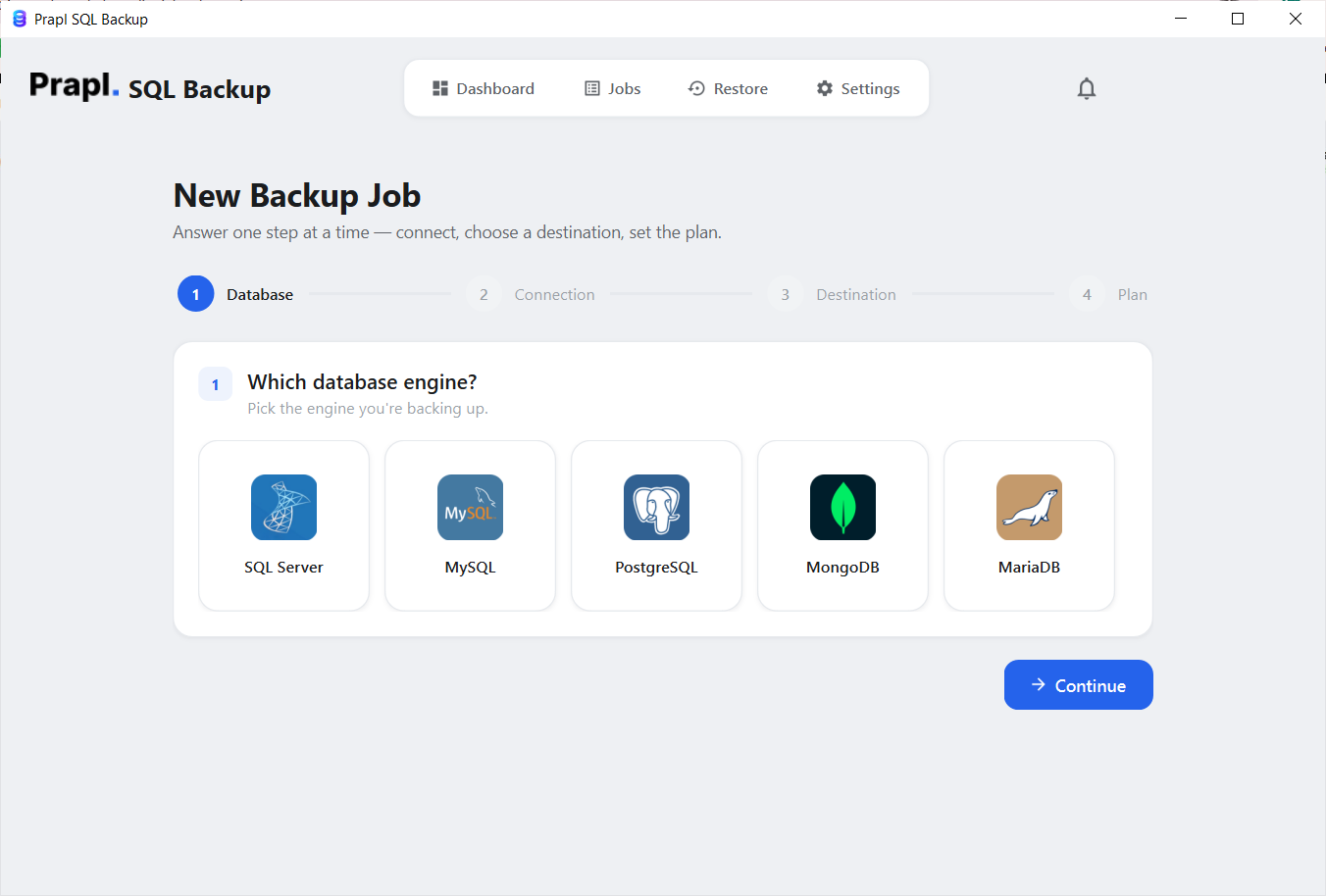
1

Pick your engine

MySQL, PostgreSQL, MongoDB or MariaDB — choose what you're protecting.

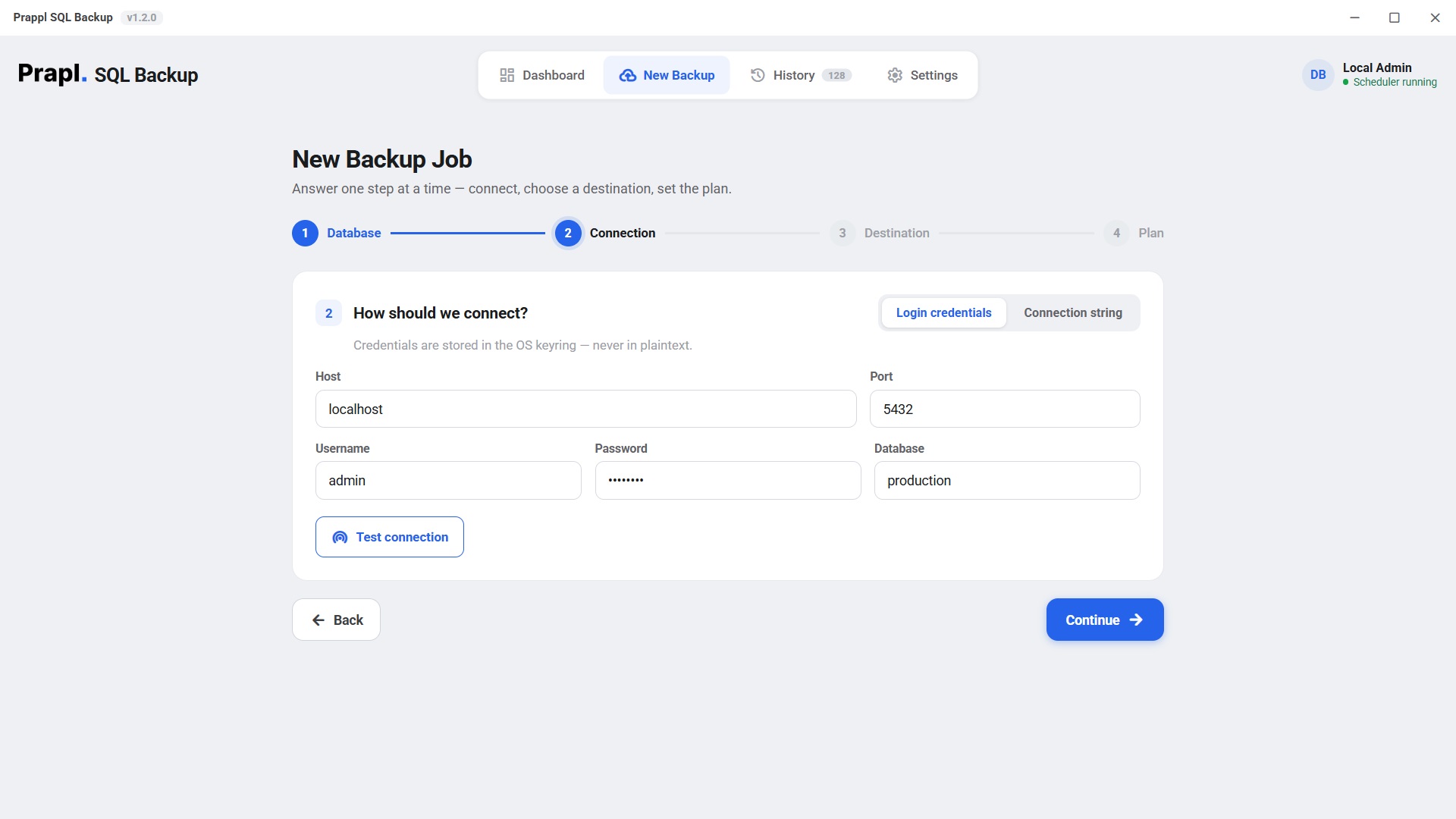
2

Connect

Host, port, credentials — stored in your OS keyring, never in plaintext. Test the connection with one click.

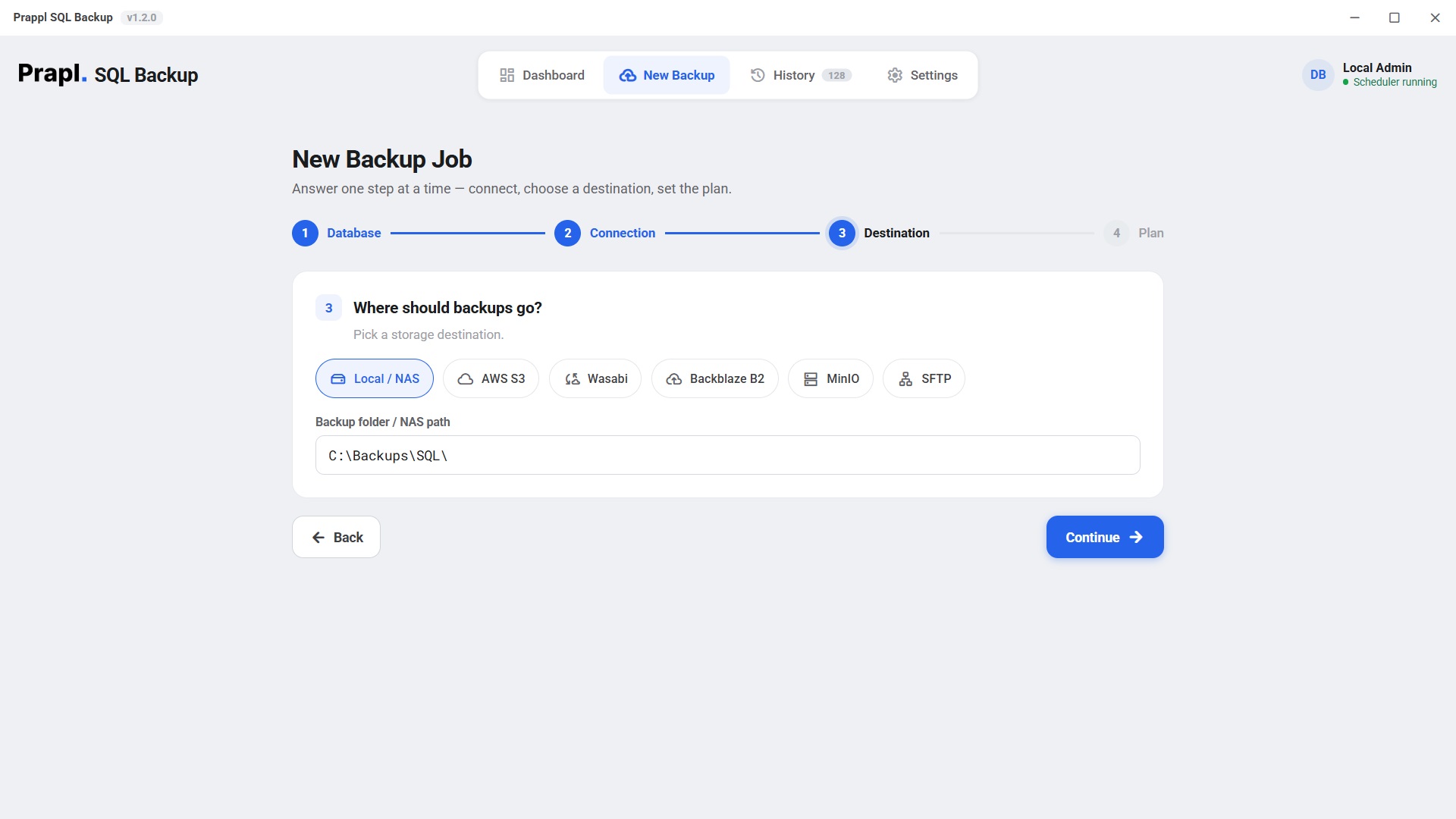
3

Choose a destination

Local folder, NAS, AWS S3, Wasabi, Backblaze B2, MinIO or SFTP — your storage, your rules.

4

Set the plan

Schedule, retention, compression, encryption, verification, alerts. Save & run — you're protected.

New backup job · step 4 — plan
Backup plan screen with schedule options — manual, hourly, daily, weekly or monthly — plus retention count, email alerts, gzip compression, AES-256 encryption and checksum verification
Backups on your terms

Daily. Weekly. Monthly. Your call.

Every database has its own rhythm. A busy store might want hourly backups; an internal tool is fine with weekly; an archive database only needs monthly. SQL Backup lets every job have its own schedule, retention and destination.

Tell it to run daily at whatever time suits you, keeping as many copies as you like — and that one sentence becomes your whole backup policy: full snapshot, gzip compression, AES-256 encryption, checksum verification, automatic pruning, and an email if anything ever fails.

ManualHourlyDailyWeeklyMonthlyCustom retentionEmail on failure
Compatibility

Works with your stack, on your OS

MySQL 5.7+ PostgreSQL 12+ MongoDB 4.4+ MariaDB 10+
Windows 10 & 11 Windows Server 2016+
Local / NAS AWS S3 Wasabi Backblaze B2 MinIO SFTP
Get it

Try it free. Buy when convinced.

15 days full-featured, no card. When you're ready, pricing lives on one simple page — per machine, unlimited databases.

15-day free trial

Full product, every feature. No payment, no credit card, no account hoops — download and start protecting tonight.

14-day money-back

Buy it, use it for real. If it's not right within 14 days of purchase, tell us and we refund you — no forms, no fight.

Never auto-renews

We don't store your card and quietly charge it next year. When your year ends, renewing is a choice you make — not a charge you catch.

Questions

Good to know

Which databases can it back up?

MySQL, PostgreSQL, MongoDB and MariaDB. One license covers every database and every backup job on a single machine — you pay per machine, never per database. Mix engines freely.

Where are my backups stored?

Wherever you choose: a local folder, a NAS path, AWS S3, Wasabi, Backblaze B2, MinIO or any SFTP server. SQL Backup runs on your machine and writes directly to your storage — backup data never passes through Prapl's servers.

How flexible are the schedules?

Each job can run manually, hourly, daily, weekly or monthly, at the exact time you pick. Retention is per-job too — you decide how many copies to keep and for how many days, and older archives are pruned automatically.

Is my data encrypted?

Yes. Backups are encrypted with AES-256 before they're written and compressed with gzip to save 60–75% of space. Connection credentials are stored in your operating system's keyring — never in plaintext files.

How do I know a backup will actually restore?

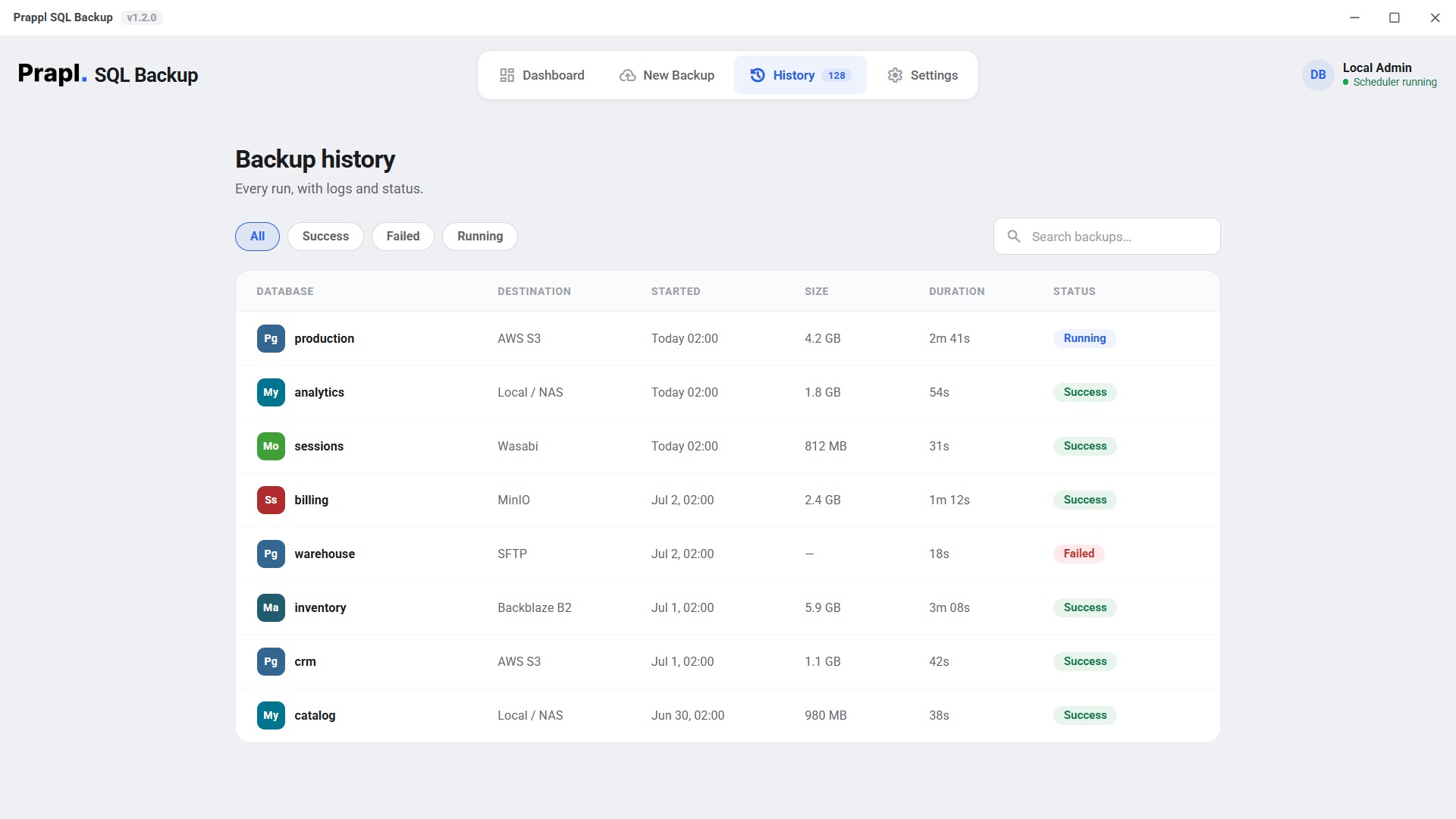
Every archive is checksum-verified right after it's written, and every run is logged in the history view with size, duration and status. If a job fails, you get an email within minutes — so you find out long before you ever need the file.

How does the 15-day free trial work?

Download and use the full product for 15 days — every feature, no payment details, no credit card. When the trial ends nothing is charged, because we never had your card to begin with. Your existing backups remain yours either way.

Will my license auto-renew?

No — never. A license is $5/month billed annually ($60 for 12 months). Near the end of your year we'll remind you, and renewing is a manual choice you make. There is no stored card and no surprise charge.

What if I buy it and it's not right for me?

Every purchase comes with a 14-day money-back guarantee. Email support within 14 days of buying and we'll refund you in full — no questionnaire, no hoops.

Tonight, while you sleep,
something will run.

Make sure it's your backup — not your luck. 15-day free trial, no credit card, 14-day money-back guarantee.

Runs on your machine Your keys, your storage Never auto-renews
Back to all products