

Moving website from one hosting to another means more than simply copying files from one server to another. Your website files, database configuration and domain settings all need to be moved correctly to keep the website working. If your website is currently hosted on GoDaddy and you want to move it to Hostinger, you need to transfer the website files, move the database, test the new set and then point your domain to Hostinger. There are two different ways to transfer website from GoDaddy to Hostinger. You can manually migrate everything using FTP and phpMyAdmin or use a direct tool to make the process easier without downloading and re-uploading. This guide explains both methods step by step.
Table of Contents
- Why Transfer Website from GoDaddy to Hostinger?
- How to Move Website from GoDaddy to Hostinger?
- Method 1. Migrate Website from GoDaddy to Hostinger Manually
- Method 2. Transfer Website from GoDaddy to Hostinger Without Downloading
- Comparison Table: Which Method Should You Choose?
- Conclusion
Why Transfer Website from GoDaddy to Hostinger?
There are many reasons to move from GoDaddy to Hostinger. For many website owners, the main reasons are cost, performance, ease of use and included features.
- Lower Cost: GoDaddy often offers attractive prices for the first term but the renewal price can be higher. Hostinger may offer more affordable long-term hosting plans, which can help reduce hosting costs over time.
- Better Performance: Website speed is important for both visitors and search engines. Hostinger uses technologies such as LiteSpeed and built-in caching on supported plans, which can help websites load faster.
- Easy-to-use Control Panel: Hostinger uses hPanel to manage hosting, domains, files, databases and other settings. Its simple interface can make more common hosting tasks easier, especially for beginners.
- Useful Hosting Features: Hostinger hosting plans may include features such as SSL certificates, backups and WordPress installation tools. Having these features available in the hosting account can make website management more convenient. For these reasons, users may choose to move their website from GoDaddy to Hostinger when their current hosting plan no longer meets their needs.
How to Move Website from GoDaddy to Hostinger?
There are two simple approaches to do it:
- Transfer the website manually
- Use a professional tool for migration
Before you begin, always take a full backup of your website files and database. This protects you if anything goes wrong. Keep your domain login details ready too, because you may need to update DNS settings at the end.
Now let’s look at the methods.
Method 1. Migrate Website from GoDaddy to Hostinger Manually
The manual method requires you to download your website from GoDaddy and then upload it to Hostinger.
Step 1. Download Your Files from GoDaddy
Log in to your GoDaddy hosting account and open the File Manager or connect using an FTP Client like FileZilla. Download the entire public_html folder to your computer. This contains all your website files.
Step 2. Export Your Database
If your site uses WordPress or any database-driven system, open phpMyAdmin in GoDaddy. Select your database and click Export. Save the .sql file safely.
Step 3. Upload Files to Hostinger
Log in to Hostinger’s hPanel and open the File Manager, or use FileZilla again. Upload all your files into the public_folder on Hostinger.
Step 4. Import your Database
Create a new database in Hostinger under the Database section. Then open phpMyAdmin, select the new database and import the .sql file you exported earlier.
Step 5. Update the Configuration File
For WordPress, edit the wp-config.php file and update the database name, username and password to match your new Hostinger database.
Step 6. Point Your Domain to Hostinger
Finally, update your domain’s nameservers or DNS records to point to Hostinger. Once update your site will load from the new host.
Manual transfer is reliable, but it takes time and requires some comfort with files and databases.
Method 2. Transfer Website from GoDaddy to Hostinger Without Downloading
The manual method works, but it comes with a few real problems. In this approach, you need to download every single file to your computer and then upload it to all over again. So, if your site has multiple files, this can take hours to complete the process. Large uploads often fail, time out, or get corrupted, forcing you to start again. This is exactly where the Prapl FTP to FTP File Transfer tool helps. Instead of routing files through your computer, it connects directly to both server and copies everything from GoDaddy to Hostinger. Your local machine is out of the loop, the transfer is far faster and much more stable.

The setup is simple, just enter your login details for both hosts. So even non-technical users can handle it easily. However, this is mainly suited for static HTML websites where all of the content lives inside the files themselves. If your site runs on WordPress, moving the files alone is not enough. You must also export the database from GoDaddy and import it into Hostinger manually.
Steps to Use the Software to Transfer Website
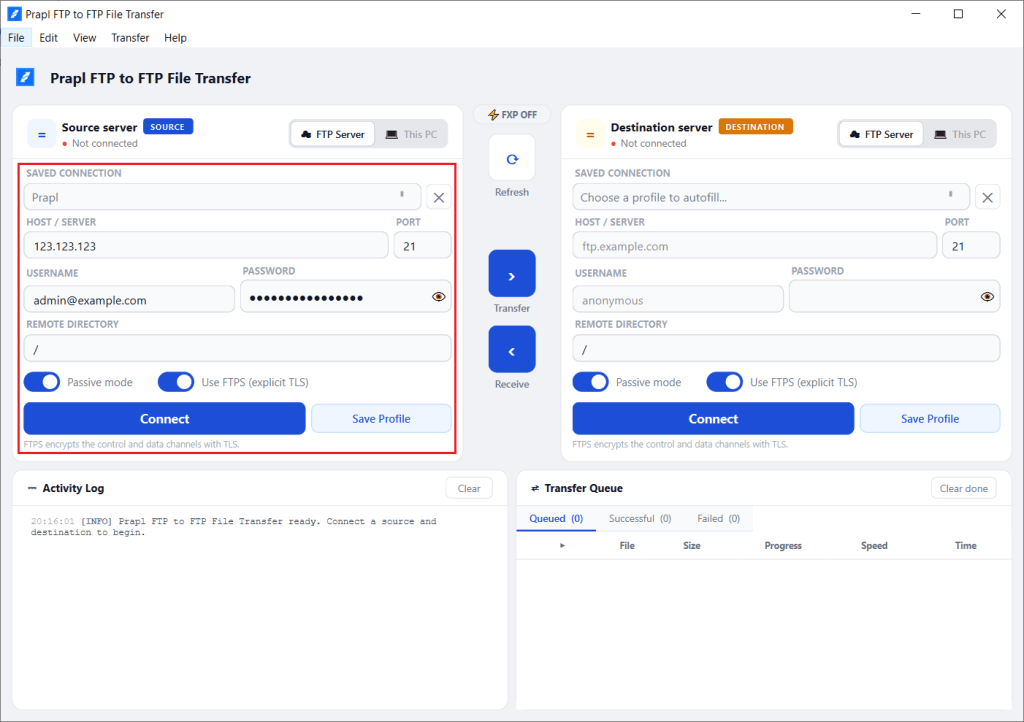
1. Launch the tool and enter the host, port number, username and password of the GoDaddy server and click Connect.
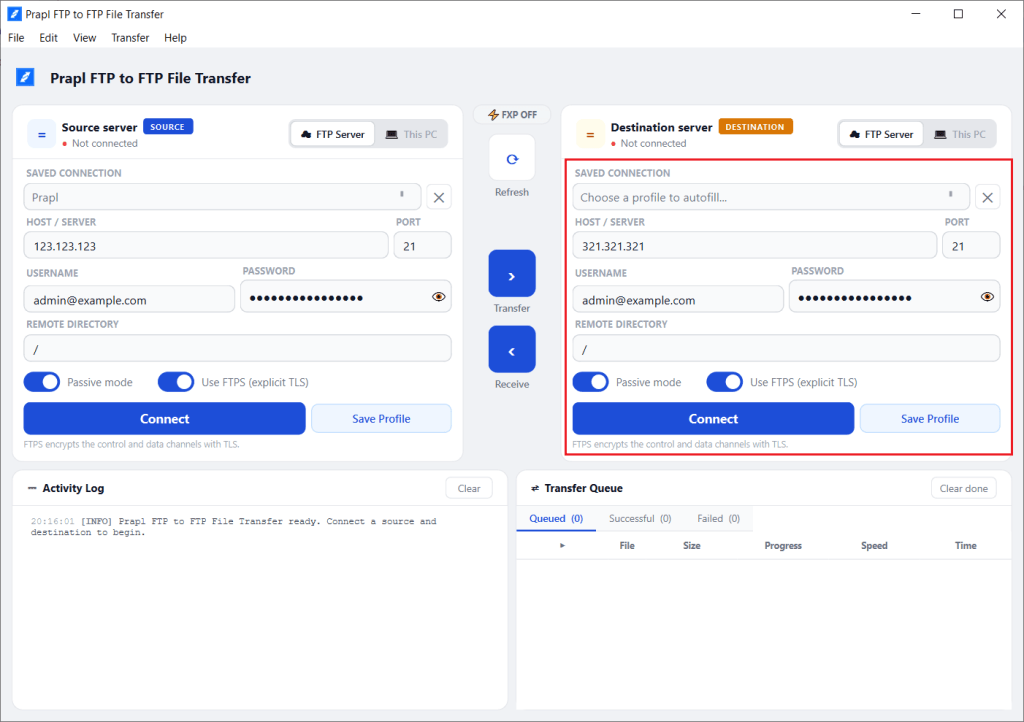
2. Now, enter the host, port, username and password of the Hostinger server. After that, click the Connect button.
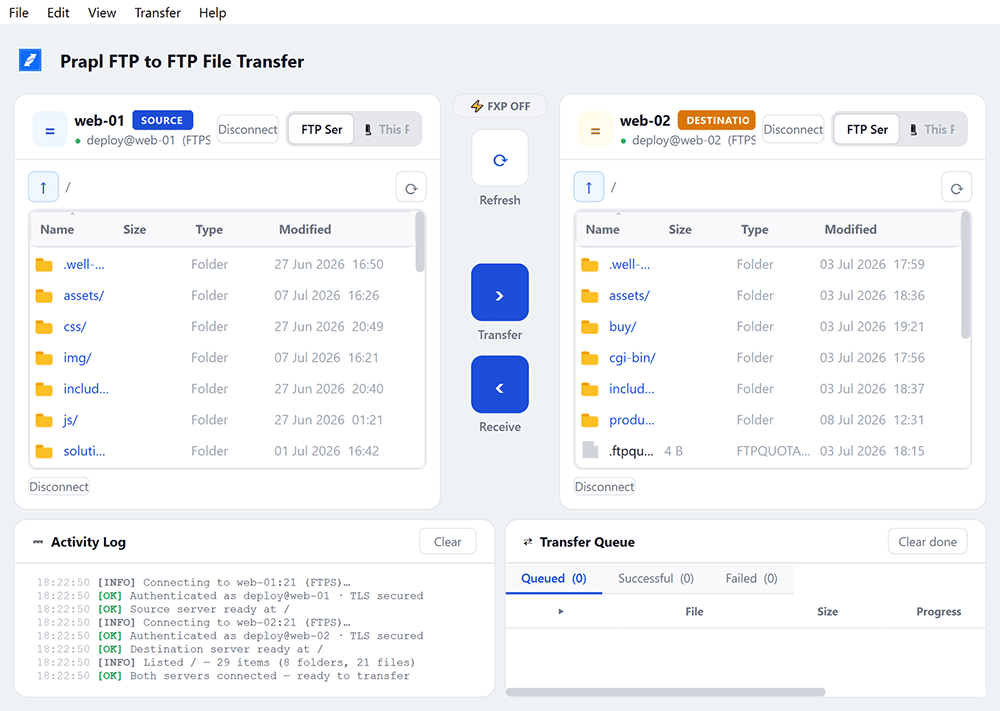
3. After connecting, both servers are open side by side. Select files or folders to move and click on Transfer.
Comparison Table: Which Methos Should You Choose?
| Feature | Manual Method | Prapl FTP to FTP File Transfer |
|---|---|---|
| Speed | Slow | Fast |
| Uses Local Bandwidth | Yes | No |
| Skill Needed | Moderate | Easy |
| Downloading and Uploading Files | Yes | No |
| Best for | Small Websites | Large Websites |
Conclusion
Migrating a website from GoDaddy to Hostinger is not as hard as it looks. Here, we have explained two simple methods to transfer website from GoDaddy to Hostinger. If you have a small site, the manual method works perfectly. But if you have a larger website and want to move directly without downloading and uploading, the software makes the process faster and smoother.